

Getting started
Set up your first budget in about five minutes and see your balance for every day ahead.
Tandilo Budget answers one question: what will my balance be on any given day? Instead of only totalling last month, it projects every account forward using the money you know is coming in and going out.
Create your account
Sign up with your name, email and a password, then confirm your email address. The link in the confirmation email opens your first budget.
The setup wizard
A short wizard collects what Tandilo needs to project your balance. Every step can be skipped and changed later.
- Name and currency for the budget (for example "Personal", in CAD).
- Accounts — your checking, savings, credit cards or cash, each with today's balance.
- Income — your pay: amount, how often, and the next payday.
- Housing — rent, mortgage, or neither.
- Expenses — the regular bills you already know about.
- Debts — loan or card payments.
- Review — check everything, then finish.
In a hurry? Skip wizard takes you straight to the app; you can add accounts and recurring bills by hand. Your answers are saved as you go, so you can stop and come back later — even from another device.
What you see next
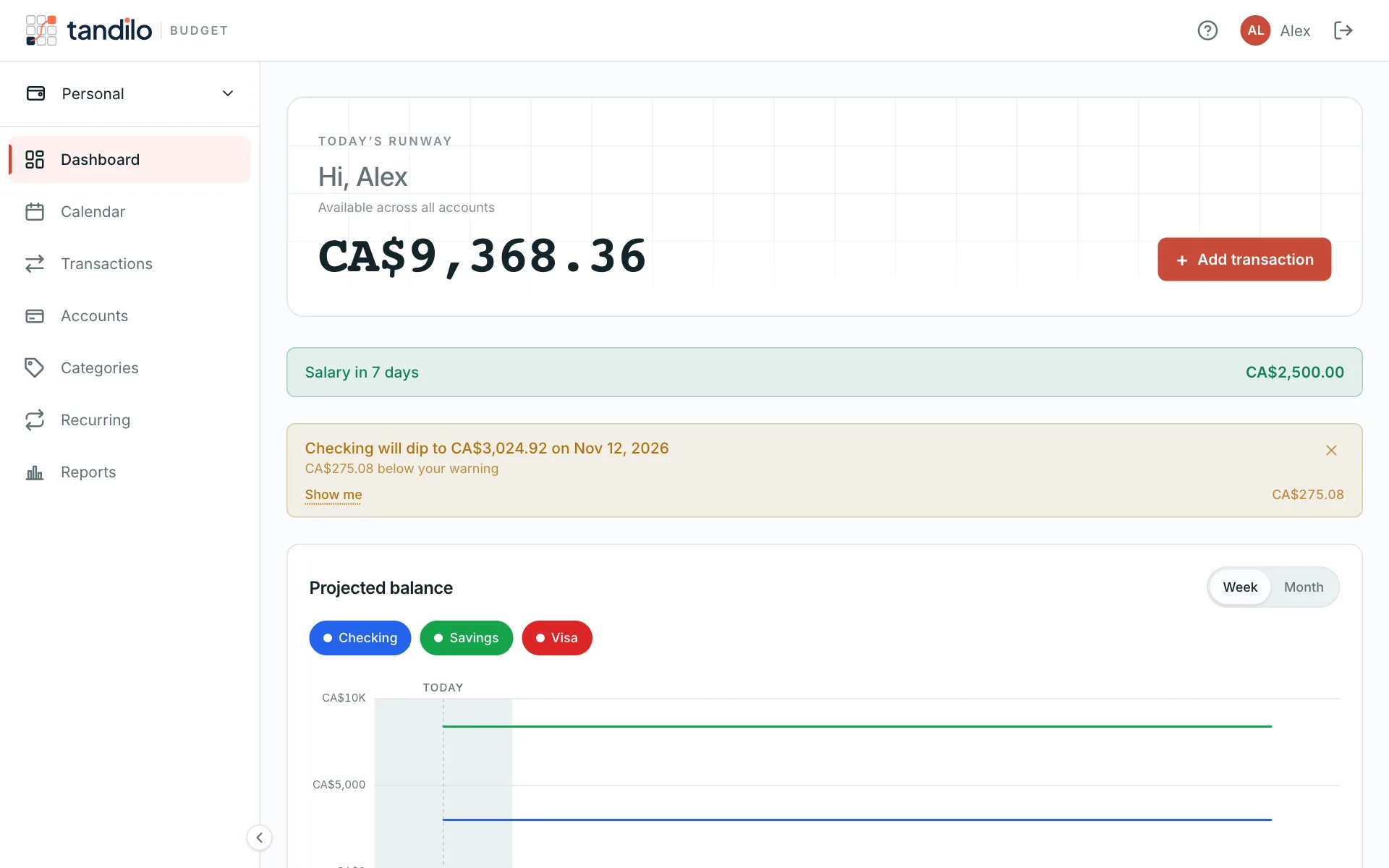
The Dashboard shows today's balance across your accounts, the next payday, any low-balance warning, and a chart of the weeks ahead. The Calendar shows the projected balance for each day.
Still stuck?
Write to us — a human answers every message, usually within 1–2 business days.
Contact support