

Recurring income and bills
Paydays, rent, subscriptions — set them once, then adjust a single occurrence when life happens.
Recurring items are what make the projection useful. Open Recurring to see them all, with the next date of each.
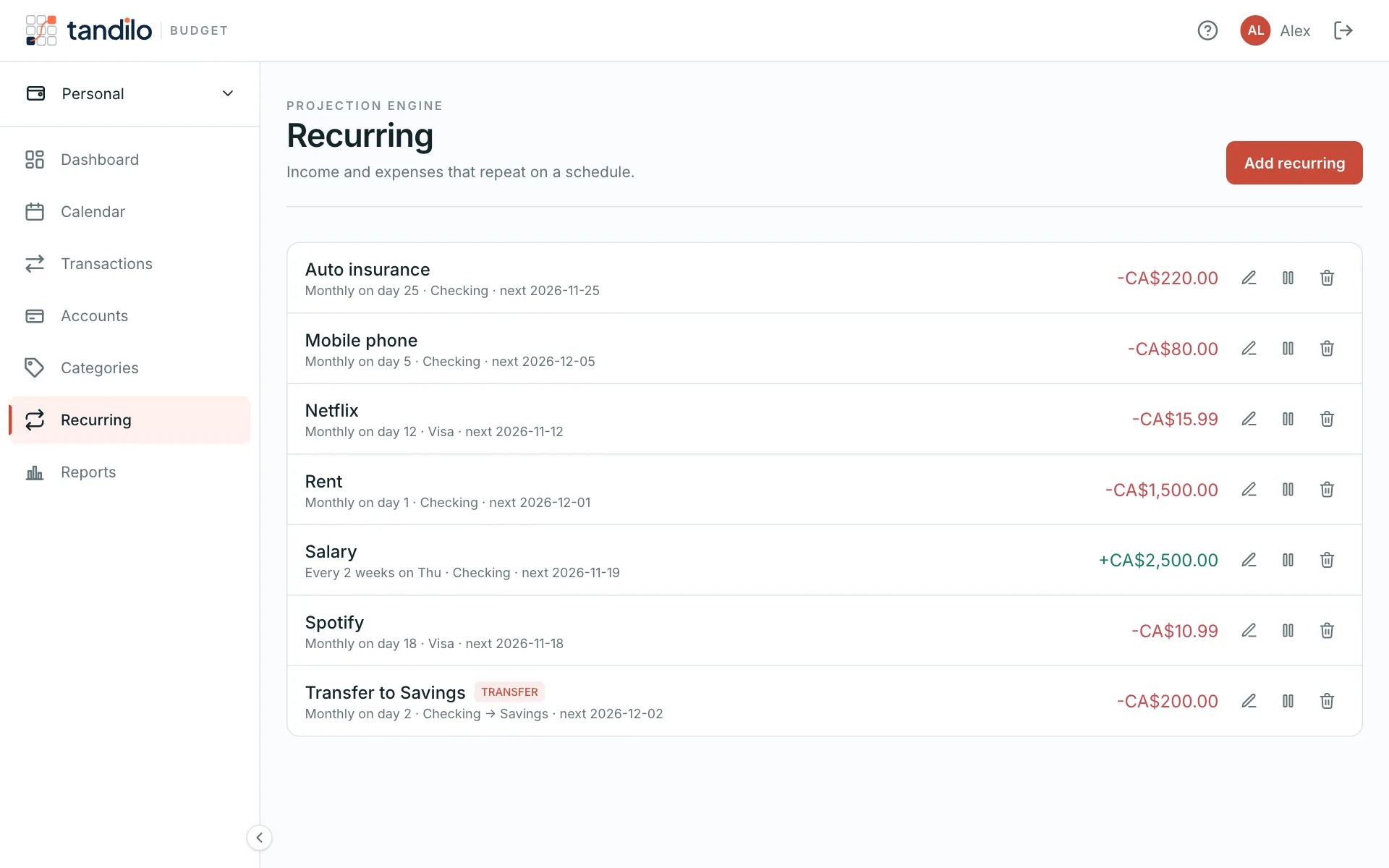
Creating a recurring item
Add a transaction and set Repeats, or use Recurring. Choose:
- Frequency — daily, weekly (pick the days), every two weeks, monthly (pick the day of the month) or yearly, with an optional "every N" interval;
- Starts on — the first occurrence;
- Ends — never, on a date, or after a number of times;
- the account, amount and category.
Income is positive, bills are negative — Tandilo sets the sign from the type you pick.
Changing one occurrence
Paid the hydro bill two days late, or it was higher this month? Edit that occurrence and choose:
- Just this one (exception) — only that date changes; the rule keeps going;
- This and all future occurrences — the rule itself changes from that date.
Skipping or ending
When you delete an occurrence you can Just skip this one (the rule keeps running) or End rule from here (this occurrence and all future ones go away).
Pausing
Pause a rule to take it out of the projection without deleting it — handy for a subscription you suspended. Resume it whenever you like.
Still stuck?
Write to us — a human answers every message, usually within 1–2 business days.
Contact support